| Configurations | |
| Connection Method | PCIE Card Slot |
| Operating System | WIN7/WIN10/WIN11, 32/64-bit Systems |
| Galvo Scanner Control Protocol | Digital Signal, Can be Directly Connected to Commonly Used Digital Galvos Worldwide |
| ReMark Signal | Repeat Marking of Cached Content |
| Applicable Materials | Glass, Plastic, Wood, Rubber, Paper |
| Number of Input Ports | 12 Channels |
| Number of Output Ports | 8 Channels TTL/OC |
| Compatible Lasers | CO2 Laser, YAG Laser, UV Laser |
| Built-in Encryption Chip | No Need for An External Dongle |
| Equipped with a watchdog function to prevent abnormal situations caused by prolonged laser emission | |
| Configurations | |
| Connection Method | PCIE Card Slot |
| Operating System | WIN7/WIN10/WIN11, 32/64-bit Systems |
| Galvo Scanner Control Protocol | Digital Signal, Can be Directly Connected to Commonly Used Digital Galvos Worldwide |
| Adjustable Pulse Width (MOPA) Laser | Supported |
| ReMark Signal | Repeat Marking of Cached Content |
| Equipped with a watchdog function to prevent abnormal situations caused by prolonged laser emission | |
| Number of Input Ports | 12 Channels |
| Number of Output Ports | 8 Channels TTL/OC |
| Compatible Lasers | Fiber Laser |
| Built-in Encryption Chip | No Need for An External Dongle |
| Applicable Materials | Metal, Black Photosensitive Material |
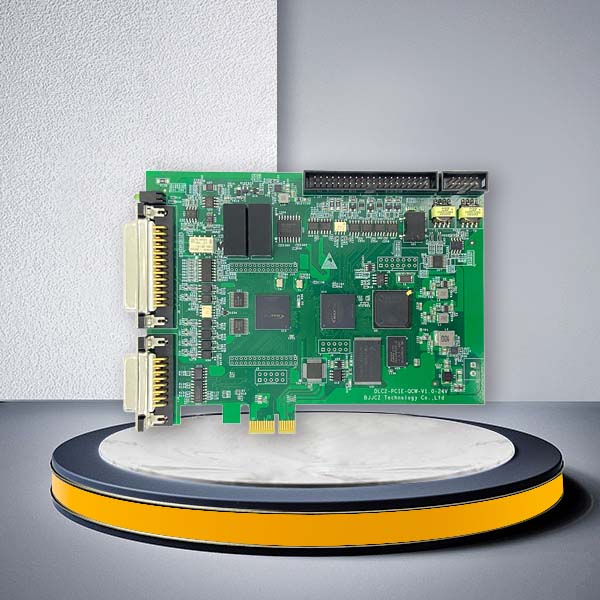
LMCPCIE Laser Marking Controller Board for EZCAD2 Systems
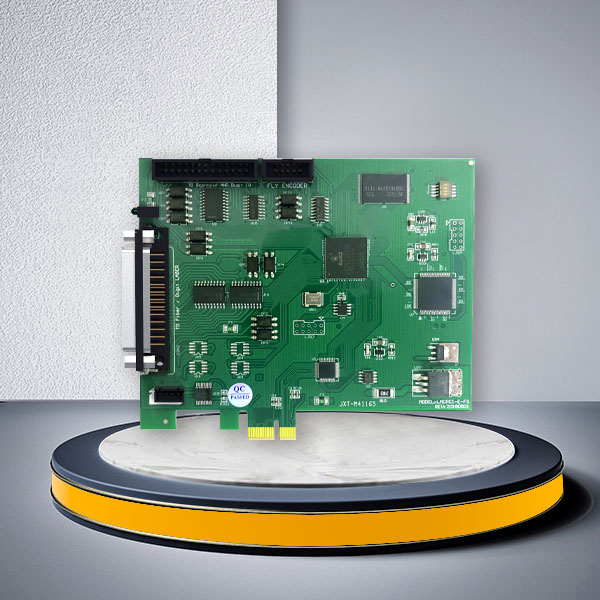
Integrate laser control directly into an industrial computer with the LMCPCIE laser marking controller board. Designed for EZCAD2-based equipment, this PCIe laser controller coordinates compatible laser sources, digital galvo scanners, marking data and external machine signals through a motherboard-mounted architecture.
The LMCPCIE Series is developed for laser machine OEMs, automation system integrators, industrial equipment builders, maintenance companies and factories requiring a stable internal control-card configuration. Fiber and Digit versions are available for different laser-source interfaces and marking applications.
What Makes LMCPCIE Different from a USB Controller?
Unlike an external USB control board, LMCPCIE is installed directly into a compatible PCIe slot inside the industrial computer. This creates a more integrated control architecture for enclosed equipment cabinets and dedicated production machines.
The PCIe configuration can provide:
- Direct motherboard connection
- Less reliance on external USB cabling
- Stronger resistance to connection interference
- Stable data communication within the industrial PC
- Cleaner integration inside the electrical cabinet
- Support for selected multi-board machine configurations
- A dedicated control computer for continuous production
It is particularly suitable for OEM equipment where the computer and laser controller are permanently installed in the same machine.
Why Choose the LMCPCIE Laser Marking Controller Board?
Developed for EZCAD2
The controller works with compatible EZCAD2 laser marking software, providing an integrated hardware and software direction for standard 2D galvo marking systems.
Fiber and Digital Laser Options
Buyers can select the controller according to the laser-source interface rather than purchasing one universal board and adapting it later.
Industrial Machine Integration
Available input and output channels can connect the controller with external triggers, sensors, alarms, interlocks, marking-complete signals and selected automation equipment.
Integrated Software Licensing
The published configuration includes a built-in encryption chip, eliminating the need for a separate external software dongle.
Watchdog Protection
The controller includes a watchdog function designed to reduce the risk of abnormal conditions caused by unintended prolonged laser emission.
Direct Support from the Control-System Developer
JCZ has focused on laser beam delivery and control technology since 2004. Because the company develops controller hardware, EZCAD software and related development tools, OEM buyers can evaluate the complete control architecture with one technical supplier.
LMCPCIE-FIBER vs. LMCPCIE-DIGIT
Each LMCPCIE laser marking controller board is designed for a specific laser-source direction. Confirm the exact source model, control signals and connector definition before ordering.
LMCPCIE-FIBER
Designed for compatible fiber laser marking systems.
Main characteristics:
- Fiber laser control
- Support for selected adjustable pulse-width MOPA configurations
- Digital galvo control
- ReMark function
- Built-in encryption chip
- Watchdog protection
- Suitable for metal and black photosensitive materials
Common applications include:
- Serial number marking
- QR and Data Matrix codes
- Hardware identification
- Automotive component traceability
- Electronic part marking
- Metal nameplates
- Tools and industrial components
LMCPCIE-DIGIT
Designed for compatible digital laser-source interfaces, including:
- CO₂ lasers
- UV lasers
- YAG lasers
Typical materials include glass, plastic, wood, rubber and paper.
Common applications include:
- Plastic component identification
- Packaging and date coding
- Glass marking
- Electronic enclosure marking
- Cable and pipe coding
- Labels and non-metal engraving
- UV precision marking
Technical Specifications
| Parameter | LMCPCIE-FIBER | LMCPCIE-DIGIT |
|---|---|---|
| Connection | PCIe card slot | PCIe card slot |
| Software | EZCAD2 | EZCAD2 |
| Operating system | Windows 7/10/11 | Windows 7/10/11 |
| System architecture | 32-bit and 64-bit | 32-bit and 64-bit |
| Galvo control | Digital signal | Digital signal |
| Galvo direction | Compatible digital XY2-100 system | Compatible digital XY2-100 system |
| Laser source | Fiber laser | CO₂, UV and YAG laser |
| MOPA support | Supported for selected configurations | Not applicable |
| ReMark | Supported | Supported |
| Built-in encryption | Yes | Yes |
| Watchdog function | Yes | Yes |
| Typical processing | Standard 2D marking and engraving | Standard 2D marking and engraving |
The number of input/output channels and supported expansion axes should be confirmed against the final hardware revision and project configuration.
Machine Integration Capabilities
Digital Galvo Control
The controller sends position signals to a compatible digital galvo scanner, allowing the laser beam to follow text, graphics, barcodes and vector paths created in EZCAD2.
ReMark Function
ReMark can repeat cached marking content without rebuilding the complete job. This is useful when identical graphics or codes must be processed repeatedly.
External Encoder and Flying Marking
For conveyor applications, the controller can be evaluated with an external encoder to track production-line movement. Final suitability depends on:
- Conveyor speed
- Encoder type and resolution
- Product spacing
- Marking field
- Required code size
- Laser power
- Sensor and trigger logic
Extension-Axis Control
Selected configurations support pulse/direction control for external motion axes. This may be used for rotary devices, positioning mechanisms or project-specific machine movements.
Multi-Board Systems
Up to eight controllers may be configured in one compatible computer for selected multi-station or multi-head projects. The industrial PC must have sufficient PCIe slots, power capacity, cooling and system resources. Final architecture should be reviewed before ordering.
Typical B2B Applications
Integrated OEM Laser Machines
Suitable for equipment manufacturers building a dedicated industrial computer, controller, laser source and galvo scanner into one machine cabinet.
High-Volume Traceability Equipment
The board can control marking of serial numbers, batch codes, QR codes and permanent product identification within a fixed production station.
Multi-Station Marking Systems
Selected multi-card configurations allow equipment developers to evaluate several marking heads or independent marking stations controlled from one industrial computer.
Automated Production Lines
The controller can exchange trigger and status signals with sensors, conveyors, sorting mechanisms and other automation equipment.
Replacement and Machine Upgrade
Maintenance companies can use the appropriate controller to replace an existing compatible LMCPCIE card after verifying the software version, source interface, galvo protocol and machine wiring.
What Is Required for a Complete System?
The controller card is only one part of the marking system. A complete machine may require:
- LMCPCIE controller
- Compatible EZCAD2 software
- Industrial computer with a suitable PCIe slot
- Compatible laser source
- Digital galvo scanner
- F-theta lens
- Laser control cable
- Galvo cable
- Breakout board
- Encoder or product sensor
- Rotary attachment or expansion axis
- Machine I/O wiring
- Electrical enclosure
- Safety interlock and emergency-stop circuit
- Fume extraction for applicable materials
LMCPCIE vs. LMCV4
Choose LMCPCIE when:
- The controller will be installed inside an industrial PC
- PCIe communication is preferred
- The machine requires a compact internal control architecture
- External USB cabling should be minimized
- A multi-card system is being evaluated
- Stronger anti-interference performance is important
Choose LMCV4 when:
- USB2.0 communication is preferred
- The controller must remain separate from the computer motherboard
- The machine uses a more conventional external control-board layout
- Easier controller access and replacement are priorities
When Should You Choose DLC2-PCIE Instead?
LMCPCIE is positioned for EZCAD2 and standard 2D laser marking. Evaluate the newer EZCAD3 control architecture when the project requires:
- 2.5D or 3D processing
- Dynamic-focus control
- Curved-surface marking
- More advanced motion expansion
- Higher-level automation
- More complex laser and galvo coordination
- New equipment designed around EZCAD3
FAQ
Is the LMCPCIE laser marking controller board a complete marking system?
No. It is the central control card. A complete system also requires a compatible laser source, galvo scanner, lens, industrial computer, cables, software and safety equipment.
Does it work with EZCAD3?
No. LMCPCIE belongs to the EZCAD2 control architecture. EZCAD3 requires compatible DLC controller hardware.
Which version should I choose?
Choose LMCPCIE-FIBER for compatible fiber laser systems and LMCPCIE-DIGIT for compatible CO₂, UV or YAG laser systems.
Does the Fiber version support MOPA lasers?
It supports selected adjustable pulse-width MOPA configurations. Compatibility must be checked against the exact laser-source interface.
Can several cards be installed in one computer?
Selected configurations can support multiple controller cards. Confirm the number of PCIe slots, computer resources, cooling and software configuration before designing the machine.
Can it be used for flying marking?
The controller can be evaluated with an external encoder for on-the-fly marking. Conveyor speed, encoder resolution, product spacing and marking requirements must be reviewed.
Is an external software dongle required?
The published configuration includes a built-in encryption chip, so a separate external dongle is not required.
Can I directly replace an old PCIe controller?
Not automatically. Provide the existing board label, photographs, software version, laser source, galvo model and cable information before purchasing a replacement.
Request a Controller Compatibility Review
Send your laser source model, galvo model, computer configuration, current controller photographs, EZCAD2 version and required machine functions. JCZ will help determine the appropriate Fiber or Digit controller, necessary accessories and integration direction.