Top Integration Checks Before Buying a Large Enclosed Laser Marker
Key Takeaways
- A large enclosed laser marker is a system of tightly coupled subsystems — software, laser source, galvo scanner, and safety hardware. Integration gaps cause downtime, not just slowdowns.
- Before purchase, verify that the control software can handle your file formats, automation protocols, and future customisation needs through SDKs.
- Beam quality metrics such as M² factor and repetition rate directly determine marking precision on metals, plastics, and coated surfaces.
- Galvanometer scanner speed and stability must match the enclosure’s working area; slow scan heads become the bottleneck when marking large parts.
- Safety interlock performance and enclosure sealing are non-negotiable when operators work near the system. Confirm compliance with laser safety standards before the machine ships.
- Plan for expandability — confirming that the controller board, software, and I/O ports support future accessories or vision modules prevents expensive retrofits.
Why Integration Checks Make or Break a Large Enclosed Marker
Buying a large enclosed laser marker involves more than picking a laser power rating and a table size. You are choosing a production cell that must accept your existing CAD data, communicate with your MES, and survive a 24/7 duty cycle on a factory floor. An overlooked incompatibility in the control board or a scanner that drifts when hot will turn a six-figure asset into a bottleneck.
Engineers who approach this purchase methodically ask two questions first. Can the machine be integrated into my automation line without a third-party middleware nightmare? And will the beam stay consistent across the entire working envelope after 10,000 cycles? Systems that look identical on a specification sheet diverge sharply once they are bolted down and asked to run. The checks below address the areas where integration problems typically hide — software architecture, laser source quality, galvo dynamics, enclosure safety, and I/O expandability.
Integration Checkpoints: What Deserves Your Attention
The table below maps each area of concern to a practical evaluation point. Use it as a checklist when reviewing a quotation or visiting a demonstration room.
| Integration Area | What Can Go Wrong | What to Validate Before Delivery | Key Metric or Standard |
|---|---|---|---|
| Control Software & SDK | File import lag, protocol mismatch, locked-down editing | Latency on large vectors, support for .dxf/.svg/.plt, API availability | 32-bit vs. 64-bit processing architecture |
| Laser Source Quality | Uneven depth, thermal lensing, wide kerf on fine features | M² value across chosen wavelengths, pulse-to-pulse stability at full rated repetition rate | M² < 1.2 (typical for industrial nanosecond sources) |
| Galvanometer Scanner | Overshoot on edges, repeatability drift, slow long-stroke marking | Acceleration bandwidth, long-term thermal drift specification, maximum field size the scanner can serve | Positioning speed at the outermost 10% of the field |
| Safety Interlocks & Enclosure | Operator exposure, electrical hazards, fume containment | Door interlock circuit activation time, particulate filtration efficiency, E-stop force compliance | IEC 60825-1 Laser Class 1 under all access conditions |
| Expandability & I/O | Inability to add rotary axis, vision, or conveyor integration later | Spare hardware-allocated I/O, open-slot expansion on control board, documented communication libraries | Minimum 4 dedicated digital I/O points available after base wiring |
#1 Control Software and Digital Twin Capability
Large enclosed markers often run batch files with thousands of vector primitives. The difference between a system that stutters and one that glides through a 2 GB pattern rests almost entirely in the control software stack. Laser Software built on a 64-bit core processes complex data noticeably faster than legacy 32-bit implementations — a fact that becomes obvious when you load a detailed automotive VIN plate or an embossed texture map.
JCZ’s EZCAD family is a case in point. Ezcad2 Software runs on a 32-bit architecture and remains a robust choice for standard 2D engraving tasks, especially where cost-sensitive integrators need a proven environment with dual-axis splicing and flying marking features. If your application demands heavy 3D surface mapping or rapid processing of high-density point clouds, Ezcad3 Software moves to a completely new 64-bit architecture that significantly accelerates data handling. In-house testing of both platforms reveals that moving from a 32-bit to a 64-bit processing pipeline can reduce the internal vector parsing time by a factor that translates directly to shorter idle beam time on the shop floor.
Beyond processing speed, check for a development SDK. An enclosure marker rarely lives in isolation. You may need to trigger jobs from a PLC, pull barcode strings from a database, or log every marking event for traceability. The EZCAD2 and EZCAD3 SDKs expose a broad set of marking functions through a documented API, allowing your automation engineers to embed laser control directly into a C# or C++ application. Before signing a purchase order, ask the supplier to demonstrate a handshake with your preferred industrial protocol — EtherNet/IP, Profinet, or straightforward TCP sockets — using only the built-in libraries.
#2 Laser Source Integrity: Why Beam Quality Trumps Average Power
Marketing brochures lead with average power in watts, but integration engineers look at the M² beam quality factor. A laser with M² close to 1.0 can be focused to a spot diameter that yields crisp 0.03 mm line widths, even on reflective metals. The JCZ Elite Series nanosecond lasers, for instance, maintain an M² of less than 1.2 across selectable IR, green, and UV wavelengths. This is a specification drawn directly from the manufacturer’s technical documentation, not a generic claim.
Repetition rate flexibility matters just as much. Elite Series sources operate from 50 kHz to 5 MHz, giving the user latitude to tune pulse overlap for varied materials. At the low end, 50 kHz delivers enough energy per pulse to deep-engrave tool steel without excessive heat-affected zones. At 5 MHz, smooth polymer surface modification is possible with almost no visible dot spacing. When you inspect a demonstration unit, ask to see the marking result at both extremes under a microscope. What looks uniform to the naked eye can reveal under-weld or melt-back at 40× magnification.
Also check how the laser interfaces with the galvanometer scanner. Synchronised pulse picking through the control board prevents random first-pulse spikes that degrade edge quality. This handshake is invisible to the operator but shows up in a pass-fail test of a precision scale or a medical device UDI code.
#3 Galvanometer Dynamics Across the Full Field
A large enclosure often implies a marking area of 600 mm × 600 mm or more. Galvanometer scanners driving a set of mirrors must accelerate, settle, and reverse direction thousands of times per second at the corners of that field. If the scanner struggles to achieve full commanded speed at the outer 10% of the lens field, the mark will appear stretched or under-filled.
Look for a scanner family that combines high stability with high cost performance — attributes JCZ’s galvo units are engineered to deliver. Stability ratings should be provided as long-term drift in µrad over 8-hour continuous operation. A typical industrial galvo scanner is expected to hold position repeatability under 10 µrad when ambient temperature varies within a 5 °C window. If the supplier cannot provide this thermal drift data, assume that the system will require a warm-up period and periodic recalibration.
The integration between the galvo and the control card also determines maximum marking speed. Dual-axis splicing, supported natively by both EZCAD2 and EZCAD3, allows the controller to orchestrate a linear stage with the scan head, stitching fields together without visible seams. This capability becomes essential when the workpiece exceeds the lens field — a common scenario with large enclosure designs.
#4 Safety Interlock Circuitry and Enclosure Integrity
A large enclosed marker falls under Category 4 or Performance Level “e” requirements in many jurisdictions if operators can access the processing area during normal use. The enclosure must meet the “Class 1” condition defined by IEC 60825-1 — meaning no laser radiation above the accessible emission limit escapes under any single fault. This is not a suggestion; it is an engineering mandate.
Practical checks begin with the door interlock circuit. The control system should monitor the interlock switch state and shut the emission off within a response time shorter than the worst-case exposure duration. A typical safe-off delay for a semiconductor laser driver is under 10 ms. Ask to see the wiring diagram and the component datasheet of the interlock switch itself; redundant-channel configurations with positive-guided contacts are standard for a reason.
Fume extraction integration matters too. Large enclosures cutting plastics often generate corrosive halogen gases. The extraction unit must pull negative pressure consistently across the entire volume, typically measured at a face velocity of 0.5 m/s at the operator access point. If the enclosure does not seal around the cable entry glands or the axis pass-throughs, fume will escape and settle on optics, degrading beam quality within weeks.
#5 Expandability Before You Box Yourself In
An enclosure marker may start as a standalone workbench, but within six months someone will want to add a rotary axis for cylindrical parts, a coaxial vision camera for fiducial alignment, or a conveyor pass-through. The control board must have the physical I/O and the firmware headroom to absorb these additions without an external PLC.
Verify the number of reserved digital I/O points. A baseline system should leave at least four dedicated inputs and four outputs accessible after the safety interlock, status lamp, and door switch are accounted for. The EZCAD platform’s support for secondary development means integrators can write custom plugins that talk directly to the galvanometer card, while simultaneously reading a Keyence profilometer over a serial port — a configuration that is difficult to retrofit if the base software is locked down.
Network ports also deserve attention. An Ethernet port that only serves file transfer will stall a smart factory project. Look for an open protocol interface that allows an ERP system to send batch parameters and receive good/bad counts with timestamps. The EZCAD SDK’s 64-bit development platform exposes functions that make this bidirectional data flow feasible without opening a command shell into a Windows environment.
How to Match the Integration Profile to Your Production Target
| If your requirement is… | Prioritise… | Because… |
|---|---|---|
| High-mix, low-volume job shop with frequent file changes | Software responsiveness and wide file-format support | Continuous reprogramming with sluggish software kills profitability per hour. |
| 24/7 automotive serial number line | Scanner thermal stability and safety interlock diagnostics | Unplanned downtime from drift or a nuisance interlock trip erases throughput gains. |
| Medical device contract manufacturing needing full traceability | Control software SDK with database hooks and audit trail logging | Regulators want proof that every unit was marked with the correct parameters. |
| R&D environment exploring advanced surface texturing | Laser beam quality (M²) and repetition rate range | The ability to fine-tune pulse overlap separates a successful process from scrap. |
Frequently Asked Questions
What integration checks are most often missed before buying a large enclosed laser marker?
Buyers routinely overlook the control board’s expandability and the real-world thermal drift of the galvo scanner. Without reserved I/O and a proven SDK, a machine that fulfills today’s requirement may be obsolete the moment a new part shape arrives.
How can I verify that the laser software can handle my production file sizes?
Request a benchmark with a file representative of your largest expected job — at least 500,000 vector entities. Observe whether the raster-to-vector conversion throttles the interface and whether the laser pauses between filled objects. This hands-on test exposes architectural limitations quickly.
Does a higher repetition rate always mean faster marking?
Not necessarily. After a certain threshold, the pulse energy drops so low that effective material removal stalls. The optimal repetition rate balances pulse energy and scan velocity, and it varies with the metal substrate. Always test on your own material before accepting a specification sheet.
What safety certifications should a large enclosed system carry?
The enclosure must be labelled with its Laser Class under IEC 60825-1, typically Class 1 when all guards are in place. Electrical safety compliance with EN 60204-1 and functional safety validation of the interlock loop to at least Performance Level “c” (per ISO 13849) are minimum expectations.
Final Thoughts
Top integration checks before buying a large enclosed laser marker concentrate on five points: software architecture, beam quality, scanner dynamics, enclosure safety, and hardware expandability. Each of these areas can cause a failure that is invisible during a 20-minute demo but becomes chronic under production pressure. An engineer who walks into vendor evaluation with specific, quantifiable questions — M² value, drift specification in µrad, interlock response time, available SDK function set — forces the supplier to deliver an industrial tool rather than a showroom piece.
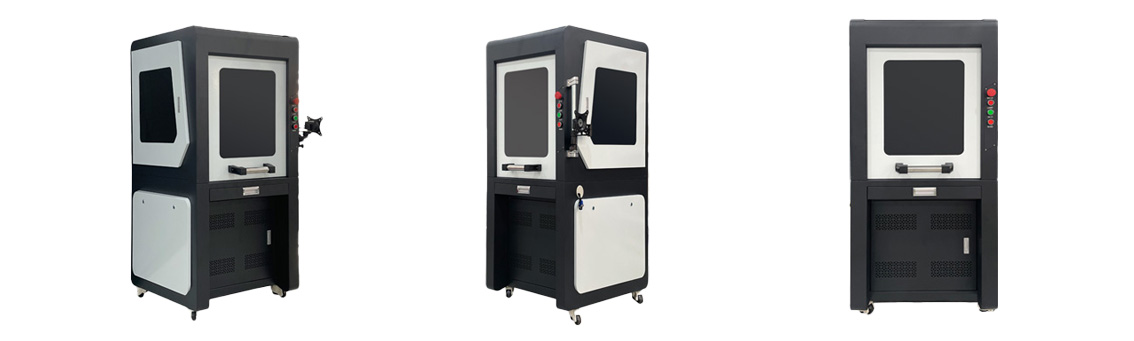
Large-format enclosures housing JCZ control platforms illustrate how a unified software and hardware ecosystem can ease integration. When the laser source, galvo scanner, and control card share a common design language, the system tune-up that often consumes days of a field engineer’s time shrinks to hours. Still, every factory floor is unique. Insist on testing the exact configuration that will land at your dock, loaded with your own CAD files and your own automation handshake routines. That final validation — not the glossy brochure — determines whether the marker becomes a revenue stream or a maintenance headache.
OFFICIAL DRIVER UPDATE NOTICE
Trends in Enclosed Laser Marking Cell Integration

2026 Mid-Autumn Festival and National Day Holiday Notice

Top Factors That Affect Marking Quality in Handheld Fiber Laser Systems

Meet JCZ at Laser World of Photonics India 2026 in Bengaluru
Laser Marking Fabric with Portable Laser Engraver: Advanced UV Laser Marking Solutions for Modern Manufacturing