| Configurations | |
| Connection Method | USB2.0 |
| Operating System | WIN7/WIN10/WIN11, 32/64-bit Systems |
| Galvo Scanner Control Protocol | Digital Signal, Can be Directly Connected to Commonly Used Digital Galvos Worldwide |
| Adjustable Pulse Width (MOPA) Laser | Supported |
| ReMark Signal | Repeat Marking of Cached Content |
| Number of Input Ports | 12 Channels |
| Number of Output Ports | 8 Channels TTL/OC |
| Compatible Lasers | Fiber Laser |
| Power Supply Method | External 5V, DC Power Supply |
| Built-in Encryption Chip | No Need for An External Dongle |
| Applicable Materials | Metal, Black Photosensitive Material |
| Configurations | |
| Connection Method | USB2.0 |
| Operating System | WIN7/WIN10/WIN11, 32/64-bit Systems |
| Galvo Scanner Control Protocol | Digital Signal, Can be Directly Connected to Commonly Used Digital Galvos Worldwide |
| ReMark Signal | Repeat Marking of Cached Content |
| Built-in Encryption Chip | No Need for An External Dongle |
| Number of Input Ports | 12 Channels |
| Number of Output Ports | 8 Channels TTL/OC |
| Compatible Lasers | CO2 Laser, YAG Laser, UV Laser |
| Power Supply Method | External 5V, DC Power Supply |
| Applicable Materials | Glass, Plastic, Wood, Rubber, Paper |
| Configurations | |
| Connection Method | USB2.0 |
| Operating System | WIN7/WIN10/WIN11, 32/64-bit Systems |
| Galvo Scanner Control Protocol | Digital Signal, Can be Directly Connected to Commonly Used Digital Galvos Worldwide |
| ReMark Signal | Repeat Marking of Cached Content |
| Built-in Encryption Chip | No Need for An External Dongle |
| Number of Input Ports | 12 Channels |
| Number of Output Ports | 8 Channels TTL/OC |
| Compatible Lasers | SPI Laser |
| Power Supply Method | External 5V, DC Power Supply |
| Applicable Materials | Metal, Black Photosensitive Material |
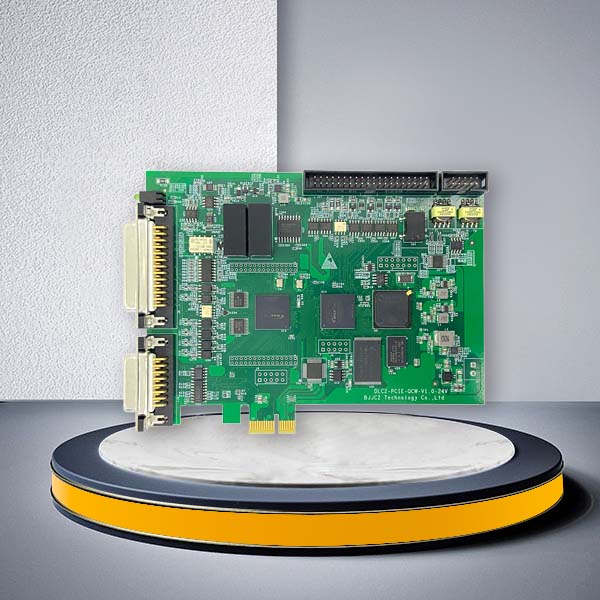
LMCV4 Laser Marking Controller Board for EZCAD2
The LMCV4 laser marking controller board is a USB 2.0 laser and galvo controller designed for EZCAD2 laser marking systems. It sits between your PC and your machine: EZCAD2 runs on the computer, and the LMCV4 control card sends the signals that drive the laser source and the digital galvo scanner, and reads and writes the machine’s input and output signals.
LMCV4 comes in three versions: LMCV4-FIBER for fiber lasers, LMCV4-DIGIT for CO2, YAG and UV lasers, and LMCV4-SPI for SPI lasers. This page helps you choose the right version, check whether it fits your laser and galvo, plan a replacement of an old board, and prepare the information we need to quote.
LMCV4 belongs to the LMC series of our laser controller range.
LMCV4 Laser Controller at a Glance
- Control card type: USB laser and galvo controller
- Software: EZCAD2
- PC connection: USB 2.0
- Operating system: Windows 7, Windows 10, Windows 11
- Galvo control: digital
- Inputs: 12
- Outputs: 8 TTL/OC
- Power: external 5V DC
- Versions: LMCV4-FIBER, LMCV4-DIGIT, LMCV4-SPI

Choose Your LMCV4 Model: FIBER, DIGIT or SPI
The first decision is the laser source. Pick the LMCV4 version that matches it, then confirm the details in the sections below.
| Model | Laser source | Main features | Choose it when |
|---|---|---|---|
| LMCV4-FIBER | Fiber laser, including MOPA | USB 2.0, digital galvo control, MOPA adjustable pulse width, ReMark, 12 inputs, 8 TTL/OC outputs, external 5V DC | You build or repair a fiber laser marking machine, especially with a MOPA source |
| LMCV4-DIGIT | CO2, YAG, UV | USB 2.0, digital galvo control, 12 inputs, 8 TTL/OC outputs, external 5V DC | Your machine uses a CO2, YAG or UV laser with a digital galvo |
| LMCV4-SPI | SPI laser | USB 2.0, digital galvo control, 12 inputs, 8 TTL/OC outputs, external 5V DC, built-in encryption chip | Your machine uses an SPI laser source |
LMCV4-FIBER
LMCV4-FIBER is the version for fiber laser marking machines. It supports MOPA adjustable pulse width, so EZCAD2 can set pulse width for MOPA fiber lasers (see JPT MOPA LP and JPT MOPA M7), and it includes the ReMark function. Check your laser model with us before ordering, because some fiber lasers require special control signals.
LMCV4-DIGIT
LMCV4-DIGIT is the version for CO2, YAG and UV laser systems. Some customers write the name as LMCV4-DIGHT. If you are unsure which board your machine needs, or you use another source such as a green laser, send us the laser model and we will confirm whether this version supports it.
LMCV4-SPI
LMCV4-SPI is built for machines that use an SPI laser source. It includes a built-in encryption chip. Send the SPI laser model and interface information so we can confirm the connection.
LMCV4 EZCAD2 Software Compatibility
LMCV4 works with EZCAD2, the laser marking software used to design graphics, set marking parameters and control the laser. The computer connects to the board with a USB 2.0 cable. Supported operating systems are Windows 7, Windows 10 and Windows 11.
The operating system list shows the supported platforms. It does not mean every driver, EZCAD2 version and Windows combination has been tested together, so tell us your EZCAD2 version and Windows version when you ask for technical confirmation. Current drivers and software are on the download page; see also the official driver update notice.
LMCV4 is an EZCAD2 controller. If your system runs EZCAD3, look at the DLC series instead.
LMCV4 Galvo Controller: Hardware Compatibility
As a galvo controller, LMCV4 provides digital galvo control. Before you buy, check that the board fits the rest of the machine:
- Laser source: brand, model, power and type (fiber, MOPA, CO2, YAG, UV or SPI), plus the control interface and signals the laser needs.
- Galvo scanner: brand, model and signal type. LMCV4 is made for digital galvo control. See our 2D galvo scanners.
- Connectors and wiring: the pin definitions of the laser and galvo connections in your machine.
- Inputs and outputs: LMCV4 provides 12 inputs and 8 TTL/OC outputs. Count the foot switches, sensors, door interlocks, start signals and indicator lights your machine uses.
- Power: the board needs an external 5V DC supply.
- Computer: a PC with a USB 2.0 port and Windows 7, 10 or 11.
Laser type alone is not enough to confirm full compatibility. Some lasers need special signals, so sending the laser manual or interface definition gives the fastest and most reliable answer.
LMCV4 Functions: MOPA, ReMark, I/O and More
LMCV4 MOPA support
MOPA adjustable pulse width is available on LMCV4-FIBER. It lets you adjust pulse width from the software for MOPA fiber lasers, which is commonly used for different marking effects on metals and plastics.
ReMark
ReMark is available on LMCV4-FIBER and supports repeated marking workflows in EZCAD2.
Inputs and outputs
The 12 inputs and 8 TTL/OC outputs let the controller work with the safety and automation parts of the machine, such as start switches, sensors, interlocks and status indicators.
Flying marking, encoder, extension axis and multihead
Some applications need flying marking, an encoder input, an extension axis or multihead control. Support depends on the LMCV4 version and on how your machine is built. If your application needs one of these functions, list it in your inquiry and our engineers will confirm what is available before you order. For dedicated in-line marking, see the fly marking system.
LMCV4 Replacement Board: Replacing an Old Controller
Many LMCV4 orders replace a damaged or obsolete controller on a working machine. A replacement can be simple, but two boards that look alike may use different connectors, wiring or laser interfaces. Cables may need to change, and EZCAD2 may need to be reconfigured.
To confirm a replacement before you order, send us:
- A clear photo of the old board, including its label and model name
- Photos of every connector and the wiring
- Your current EZCAD2 version and Windows version
- The laser brand, model and power
- The galvo scanner brand and model
- The list of input and output signals your machine uses
For a new machine design, send the planned control structure instead: laser, galvo, I/O list and any special functions. If you need a complete machine, browse our laser marking machines.
LMCV4 Price, Supplier and What Is Included
LMCV4 pricing depends on the version, the quantity, the accessories and the destination, so we quote each request individually. We work with machine builders (OEM), distributors, service shops and end users.
The LMCV4 controller board is the core item. Please confirm the following in your quotation, because they are not automatically part of every order:
- EZCAD2 software and driver
- 5V DC power supply
- USB, laser and galvo cables
- Terminal boards and other accessories
Delivery time and technical support terms are confirmed together with the quotation.
LMCV4 vs LMCPCIE vs DLC
All three are laser controllers from the same product family, but they differ in connection and software:
- LMCV4: USB 2.0 connection, EZCAD2. Suited to machines that connect through USB. This page.
- LMCPCIE: installs in a PCIe slot, EZCAD2. Suited to industrial PCs with a free PCIe slot.
- DLC series: controllers for the EZCAD3 platform.
For a deeper comparison, read JCZ LMC and DLC controller solutions. To learn how the controller, laser and galvo work together, see Understanding Laser Control Boards and The Best Laser Marking Controllers.
Where the LMCV4 Control Card Is Used
- Fiber and MOPA laser marking machines for metals, coated surfaces and plastics
- CO2 laser marking machines for wood, leather, glass, acrylic and packaging
- UV laser marking machines for heat-sensitive materials
- SPI laser marking machines
- OEM machines that integrate a USB laser controller
- Service and repair of existing EZCAD2 marking machines
Request an LMCV4 Quote
Send us the following and we will reply with a quotation and technical confirmation:
- LMCV4 version, or your laser type if you are unsure
- Quantity and destination country
- Laser brand, model and power
- Galvo scanner brand and model
- New machine or replacement; for replacement, photos of the old board
- Accessories needed: software, power supply, cables
- Special functions: flying marking, encoder, extension axis, multihead
Send your LMCV4 inquiry or browse all laser controllers.
LMCV4 FAQ
What is the LMCV4 laser marking controller board?
LMCV4 is a USB 2.0 laser and galvo controller for EZCAD2. It connects the PC to the laser and digital galvo and handles the machine’s input and output signals.
Which LMCV4 version should I choose?
Choose by laser type: LMCV4-FIBER for fiber and MOPA lasers, LMCV4-DIGIT for CO2, YAG and UV lasers, and LMCV4-SPI for SPI lasers. Send your laser model so we can confirm the interface.
Is LMCV4 the same as an LMCV4 control card or LMCV4 laser controller?
Yes. Laser controller, control card and controller board all describe the same type of product: the hardware between EZCAD2 and the laser and galvo.
Which software does LMCV4 use?
EZCAD2, on Windows 7, 10 and 11. Confirm exact driver and software versions with our technical team, and check the download page.
Does LMCV4 support MOPA lasers?
LMCV4-FIBER supports MOPA adjustable pulse width. Confirm your laser model, because some lasers need special signals.
Does LMCV4 support flying marking?
It depends on the version and machine configuration. Tell us your application and we will confirm before you order.
Can LMCV4 replace my old board?
Often yes, but a similar look does not guarantee compatibility. Send photos of the old board and connectors, your EZCAD2 version, and your laser and galvo models.
How many inputs and outputs does LMCV4 have?
12 inputs and 8 TTL/OC outputs.
What power does LMCV4 need?
An external 5V DC supply. Confirm in your quotation whether the power supply is included.
What is the difference between LMCV4 and LMCPCIE?
LMCV4 connects by USB 2.0. LMCPCIE installs in a PCIe slot. Both use EZCAD2.
Is LMCV4 compatible with EZCAD3?
No. For EZCAD3, see the DLC series.
How do I get an LMCV4 price?
Price depends on version, quantity, accessories and destination. Send your details through the inquiry page and we will quote.